3.6.1 Resume or Restart Adjudication
Adjudication work is persisted to the project’s adjudication/ folder, so it survives closing and
reopening eHOST. When you switch to Adjudication Mode, eHOST checks that folder for
.knowtator.xml files.
No previous adjudication found
The normal adjudication setup dialog opens (see 3.6 Adjudication Mode).
Previous adjudication found
A dialog offers three options:
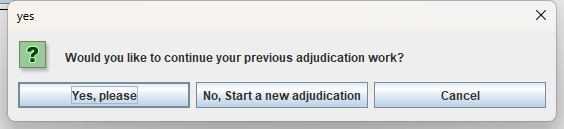
| Option | Result |
|---|---|
| Yes, please | Resume the previous adjudication. Annotations already marked as matched stay resolved; everything else is re-analyzed so you continue where you left off. |
| No, Start a new adjudication | Discard the previous adjudication and start over (a warning dialog is shown first). |
| Cancel | Return to annotation mode without changing anything. |
User clicks "Adjudication Mode"
    |
    +- No existing adjudication files -> open adjudication setup dialog
    |
    +- Existing adjudication files found
        |
        +- "Yes, please"    -> resume previous adjudication
        +- "Cancel"         -> return to annotation mode
        +- "No, Start new"  -> WARNING DIALOG
                                |
                                +- "Yes" -> clear adjudication data + open setup dialog
                                +- "No"  -> return to annotation mode
Warning before starting a new adjudication
Because starting over throws away potentially hours of work, choosing No, Start a new adjudication shows a confirmation warning stating that:
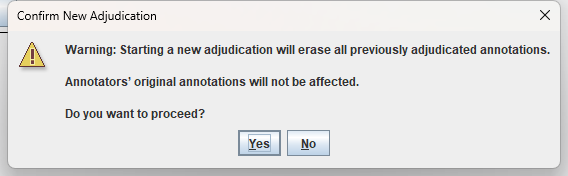
- all previously adjudicated annotations will be erased, and
- the annotators’ original annotations are not affected.
Only after you confirm does eHOST clear the in-memory adjudication data and delete the
.knowtator.xml files in the project’s adjudication/ folder. Declining the warning returns you to
annotation mode with all data intact.
Notes
- Detection is purely file based: if
adjudication/*.knowtator.xmlexists, adjudication is considered ongoing. No separate marker file or metadata block is consulted, and the annotations insaved/stay free of adjudication bookkeeping — only the files in theadjudication/folder record a per-annotation adjudication status (see 3.6.2 Adjudication Data Storage). - When resuming, the adjudication settings (annotators, classes) are reconstructed from the annotations themselves — or read from the settings block that files written by older versions still carry — so a resumed session works even if eHOST was restarted or the project was moved.
- Older projects whose adjudication files were written by earlier eHOST versions are upgraded automatically on load; see 3.6.2 Adjudication Data Storage.