eHOST Documentation

Home

1. Installation and Quick Start

  • 1.1 Prerequisites
  • 1.2 Launching eHOST
  • 1.3 Assign Workspace and Project
    • 1.3.2 Create a Project
  • 1.4 Load Documents
  • 1.5 Create Annotation Schema
    • 1.5.1 Define Classes
    • 1.5.2 Define Attributes
    • 1.5.3 Define Relationships
  • 1.6 Create Annotations
    • 1.6.2 Assign Attribute
    • 1.6.3 Create Relationship
  • 1.7 Save Annotations

2. Basic Features

  • 2.1 Workspace and Project
  • 2.2 Viewer
  • 2.3 Editor
  • 2.4 Import Annotations
  • 2.5 Annotation Operations
    • 2.5.1 Add/Delete/Modify Annotations
    • 2.5.2 Add/Delete/Modify Class
    • 2.5.3 Add/Delete/Modify Attributes and Values
    • 2.5.4 Add/Delete/Modify Relationship
  • 2.6 Assign Annotator
  • 2.7 Save Annotations
  • 2.8 System Configuration

3. Advanced Features

  • 3.1 Annotation Review and Curation
  • 3.2 Annotation Profile
    • 3.2.1 Generating Graph of Position Indicated
  • 3.3 Error Checking
  • 3.4 Oracle (Annotations Like Me)
  • 3.5 IAA Reports
  • 3.6 Adjudication Mode
    • 3.6.1 Resume or Restart Adjudication
    • 3.6.2 Adjudication Data Storage
  • 3.7 Viewing and Sharing Reports

4. Beyond Manual Annotation

  • 4.1 Pre-annotations from a Dictionary
  • 4.2 Pre-annotations from Regular Expressions
  • 4.3 ConTEXT Algorithm

5. Reference

  • 5 Glossary
  • RESTful Server Guide

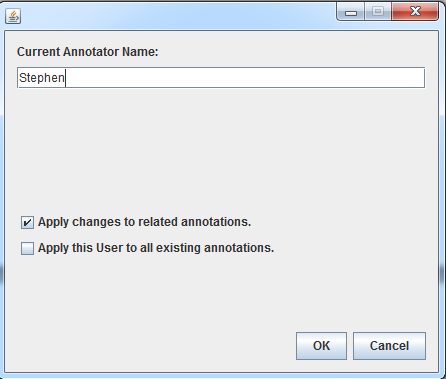
2.6 Assign Annotator

  1. Double Click to open the window.

  2. Type in the name.

  3. Click “OK” to be done.

    eHOST: Extensible Human Oracle Suite of Tools - A comprehensive annotation platform

    Most of these instructions are based on https://github.com/chrisleng/ehost/wiki