3.5 IAA Report
An IAA (inter-annotator agreement) report tells you how much two or more annotators agree, and exactly where they do not. It is the usual first step before adjudication.
Generating a report
-
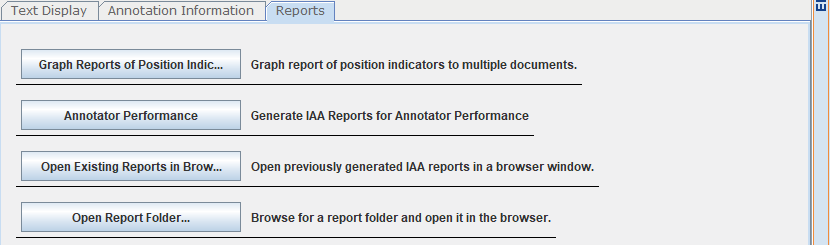
Open a project, then select the Reports tab in the Document Viewer.
-
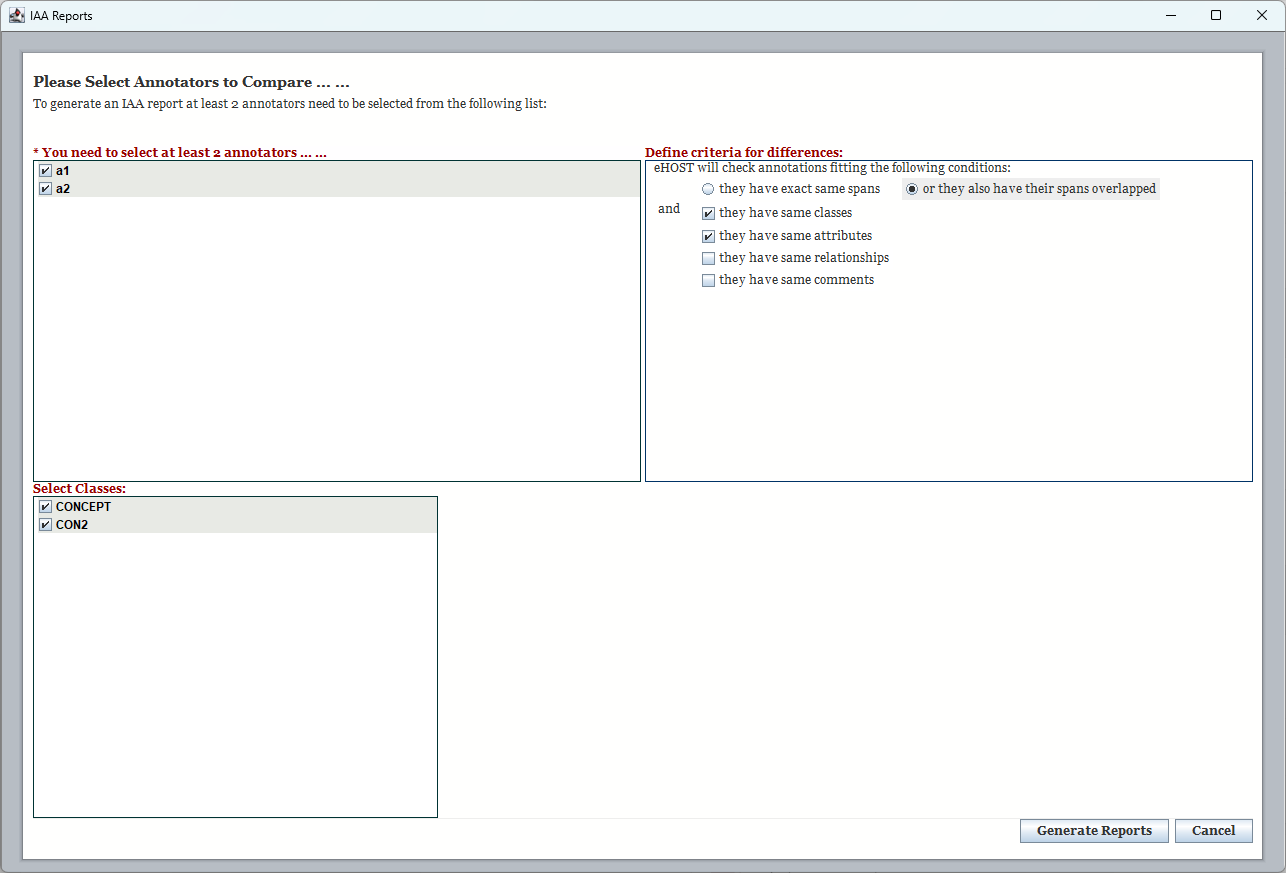
Click Annotator Performance. The IAA Reports dialog opens.
-
Fill in the dialog:
Area What to do You need to select at least 2 annotators Tick the annotators to compare. Every annotator that has saved annotations in the project is listed. Define criteria for differences Choose whether spans must match exactly or may simply overlap, and which of class, attributes, relationships and comments must also match for two annotations to count as agreeing. Select Classes Tick the annotation classes to include. Per-class detail pages are produced for each selected class. -
Click Generate Reports. eHOST writes the HTML report into the project’s
reportsfolder and shows the report index.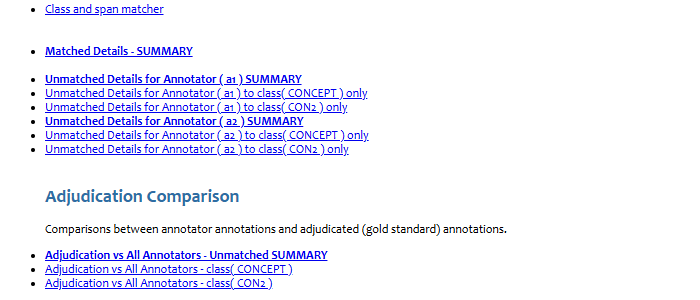
Reading the report
The generated report is a set of linked HTML pages. The index page lists:
- Class and span matcher — pairwise and N-way agreement tables (precision, recall, F-measure)
- Matched Details - SUMMARY — annotations the annotators agreed on
- Unmatched Details for <Annotator> - SUMMARY — annotations only one annotator created, plus a per-class page for each selected class
Each unmatched entry shows the surrounding sentence with the annotation highlighted, followed by a table comparing that annotation across annotators. File names are links: clicking one jumps your running eHOST to that document (see 3.7 Viewing and Sharing Reports).
Attribute comparison
In the matched and unmatched detail pages, every annotation attribute is shown on its own row so that values can be compared annotator by annotator:
| Annotator: A | Annotator: B | |
|---|---|---|
| Class | Medication | Medication |
| Dosage | 10mg | 20mg |
| Route | oral |
- Attribute rows are indented so they are easy to tell apart from the class-level rows (Class, Span, Annotation Text).
- A cell that is empty with a gray background means that annotator’s annotation does not have that attribute at all.
- A value that differs between annotators is highlighted in red.
Adjudication Comparison
If the project already contains adjudicated annotations (i.e. .knowtator.xml files exist in the
project’s adjudication/ folder), the IAA report automatically loads them as an extra annotator named
Adjudication and adds a highlighted Adjudication Comparison section to the index:
- Each annotator vs. Adjudication - unmatched summary
- Adjudication vs. all annotators - unmatched summary
- Per-class breakdowns of the unmatched details
- The pairwise and N-way agreement tables also include Adjudication
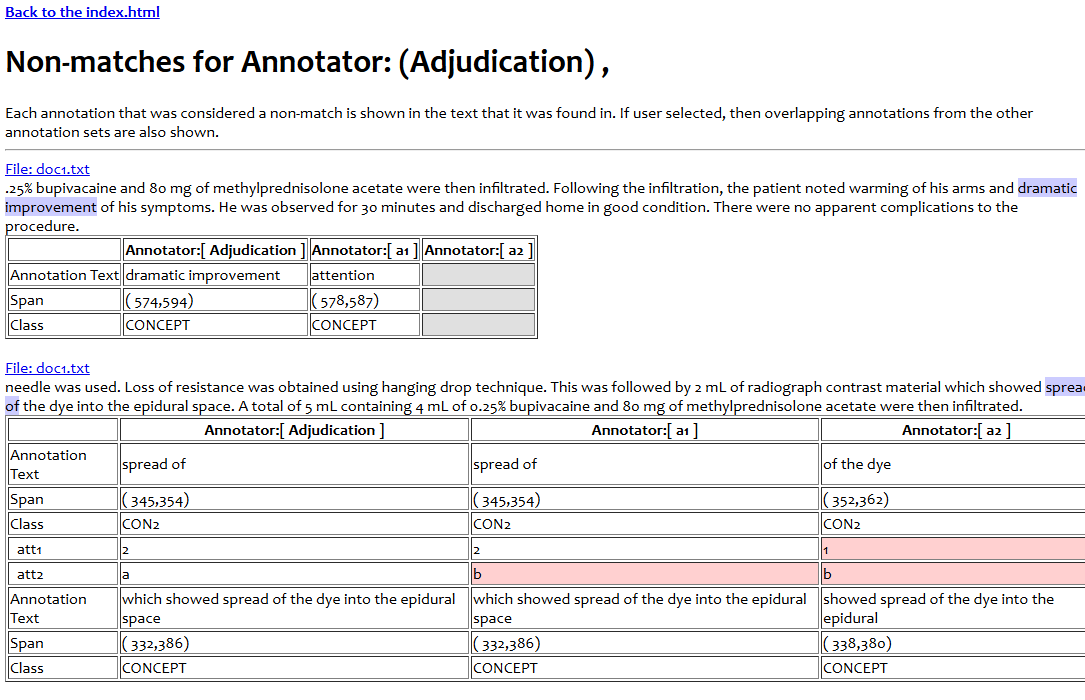
This lets you measure each annotator against the agreed-upon gold standard, not just against the other annotators. No extra configuration is needed - simply adjudicate first (see 3.6 Adjudication Mode), save, and then generate the IAA report.
Opening the Report
Reports are served through eHOST’s built-in web server so that they work correctly when several people share one eHOST installation. Use Open Existing Reports in Browser to reopen the current project’s report later, or Open Report Folder… to open a report stored somewhere else. See 3.7 Viewing and Sharing Reports.